
Tickets are sold on the Sell tab and paid for on the club's card reader.
Selling tickets
- Tap + next to each ticket type the customer wants. The total updates as you go. Each type has a maximum per sale — the + stops there.
- If they'd like the tickets on their phone, open Send tickets via SMS/email (optional) and add their name and mobile or email.
- Tap Take Payment (the button shows the total). The amount goes to the card reader and you'll see "£20.00 sent to card reader. Waiting for payment..."
- The customer taps or inserts their card. Wait for "Payment received! Tickets issued."
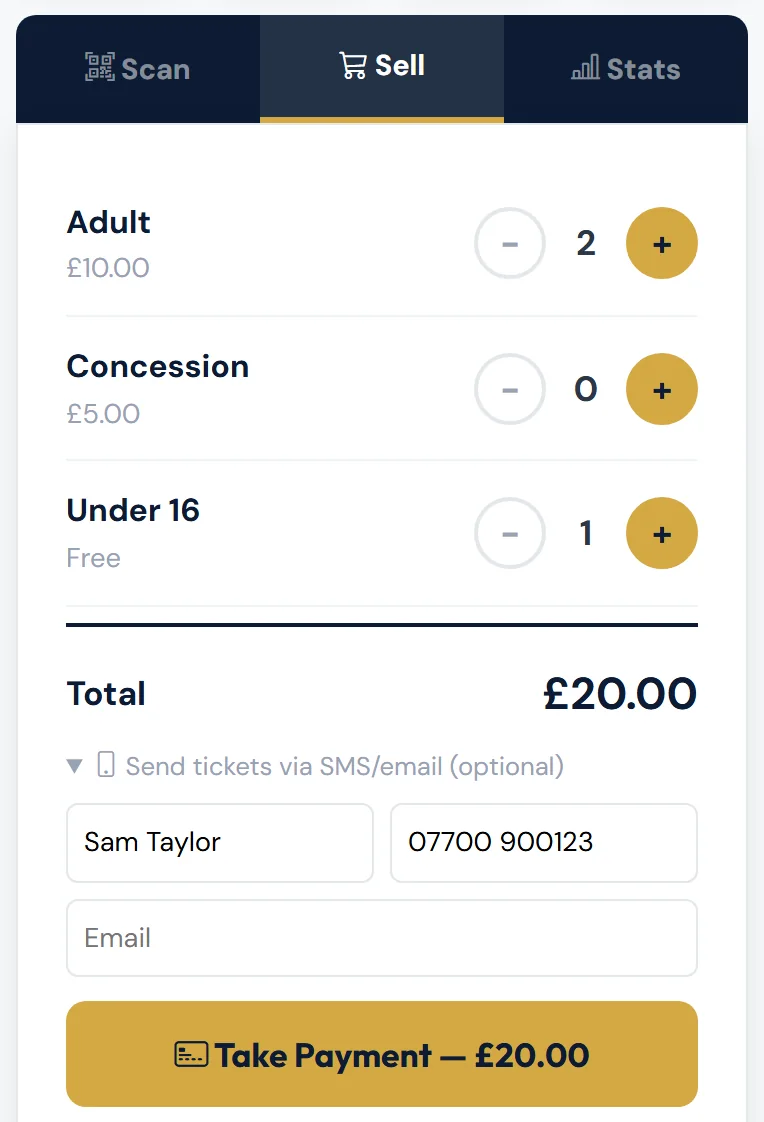
Tickets sold at the gate are checked in straight away — you don't need to scan them. If you added a mobile or email, the customer gets a text or email with a link to their tickets.
Because they're checked in as they're sold, a gate sale's check-in can't be undone. If a paid sale was a mistake, tell the office. A free ticket issued by mistake can be cancelled at the gate — see Cancelling a free ticket issued by mistake.
There's no cash option in the app. Card only.
If the payment doesn't go through
| Message | What to do |
|---|---|
| Payment didn't go through — the card was declined or the payment was cancelled on the reader. The customer hasn't been charged. | Try again, or ask for another card. |
| No Solo reader configured. Please pair a reader first. | The card reader isn't set up. Contact the club. |
| The card reader is offline. Nothing has been charged. … | Check it's switched on and connected to Wi-Fi, then try again. |
| The card reader is busy with another payment. Nothing has been charged. … | Finish or cancel that payment on the reader, then try again. |
| The card payment service didn't respond. Nothing has been charged. … | Check your phone is online and the reader is switched on, then try again. |
| The card reader couldn't start the payment. Nothing has been charged. … | Check it's switched on and connected to Wi-Fi, then try again. If it keeps happening, tell the office. |
| That card reader isn't linked to the club's account any more. Nothing has been charged. … | Choose another reader under Card Reader if there is one, or ask an admin to pair it again. |
| Card payments aren't set up on this system yet, … or The club's card payment account didn't accept the request, … | This can't be fixed at the gate. Tell the office. |
| Couldn't record the sale — please try again. If it keeps happening, note the time and tell the office. | Try again. If it keeps happening, note the time and tell the office. |
| You have been signed out. … | Reload the page and sign in. If the card was charged, the sale is still recorded — check Gate Sales. |
When a message says "Nothing has been charged.", the payment never reached the reader, so the customer hasn't paid.
Cancelling a payment
To stop a payment that's waiting, tap Cancel. The gate cancels it on the card reader and checks with the card provider whether the customer was charged. You'll see "Cancelling the payment on the card reader and checking whether the card was charged…", then the answer.
If the reader doesn't answer within 2 minutes, the gate does this by itself. The answer then starts "No answer from the card reader after 2 minutes, so the payment has been cancelled."
The answer stays on screen until you tap OK or start the next sale:
| Message | What to do |
|---|---|
| Payment cancelled. The card provider confirms the customer hasn't been charged — you can start again. | Nothing was taken. Start again if they still want tickets. |
| This payment had already been cancelled or declined on the card reader. The customer hasn't been charged. | Nothing was taken. Start again if they still want tickets. |
| The card reader says this payment went through, so the customer HAS been charged. … | They've paid. The sale is recorded and their tickets are issued, so let them in. Don't take payment again. |
| This payment had already gone through, so the customer HAS been charged. … | The same — they've paid. Don't take payment again. |
| Payment cancelled. We couldn't confirm whether a card was tapped. … | If the customer says they paid, wait a minute, then look at Recent Gate Sales on the Stats tab. If the sale is there, they've paid. If not, start again. A late payment is still recorded. |
| … We couldn't clear the card reader — press cancel on the reader itself. | Press cancel on the card reader. |
| Couldn't cancel the payment — press cancel on the card reader itself, then check Stats → Recent Gate Sales before taking payment again. | Press cancel on the reader, then check Recent Gate Sales before you try again. |
Never press Take Payment a second time without checking Gate Sales first — you could charge the customer twice. Tap the Gate Sales counter at the top of the screen, or look at Recent Gate Sales on the Stats tab.
Free tickets
If everything you've chosen is free (for example Under 16), the button says Issue free ticket(s). Tap it and you'll see, for example, "2 free ticket(s) issued and checked in." with your name.
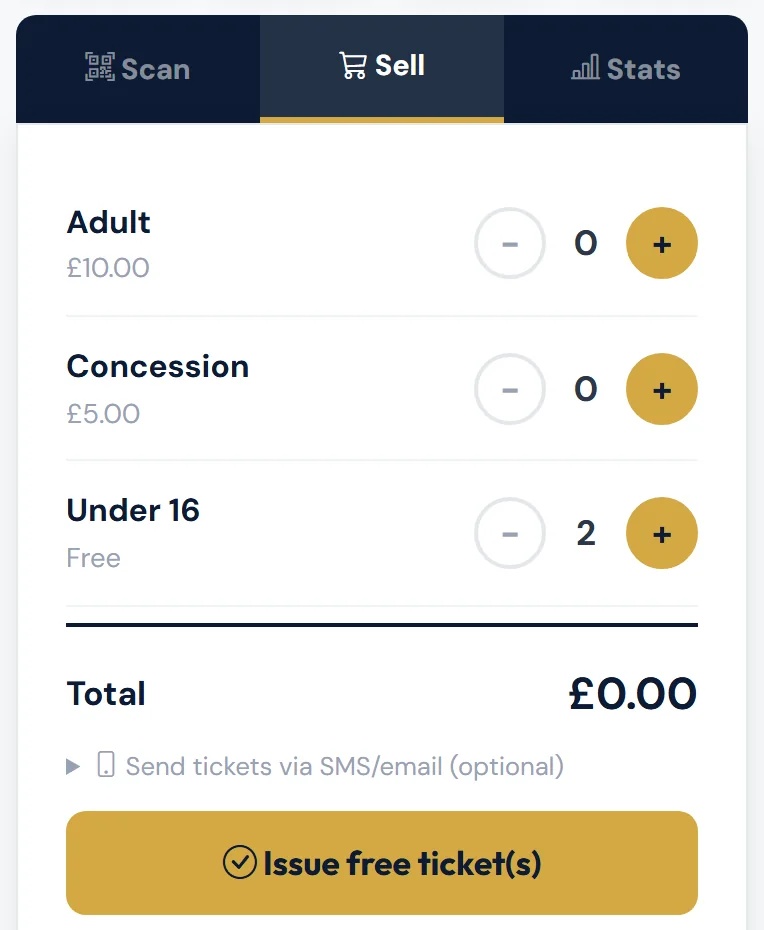
If you added a mobile or email under Send tickets via SMS/email (optional), the free tickets are sent to them too.
If you mix free and paid tickets, the customer pays for the paid ones on the card reader as usual.
Free tickets aren't sales, so they don't count in Gate Sales. They're counted under Free tickets on the Stats tab.
Cancelling a free ticket issued by mistake
- On the Stats tab (or the counters at the top), tap Free tickets.
- Tap Cancel on the ticket's row. You'll see Cancel this free ticket? with the holder, the ticket type and who issued it.
- Add a Reason (optional) if you like, such as "Issued the wrong ticket", and tap Cancel ticket. You'll see "Free ticket cancelled. It no longer counts towards attendance, and the code won't scan." Tap Keep it if you change your mind.
Only free tickets issued at the gate today, for the match that's open, can be cancelled here. Every cancellation is recorded with your name. A paid ticket needs a refund, and a complimentary or online ticket is cancelled by the office — the gate tells you which.
Which tickets you can sell
Only ticket types the club has made available at the gate appear. If the list is empty, contact [email protected] 07590 598459.
Checking the takings
The Stats tab shows who's in and what's been sold, and refreshes itself every 15 seconds:
- TOTAL ATTENDANCE — tickets checked in, season tickets, free entries and Taster Passes.
- GATE REVENUE — what's been taken at the gate.
- By Channel — Advance (bought online), Gate (paid tickets sold at the gate), Free tickets (free tickets issued at the gate, such as Under 16), Comp and Free entry. Tap Free tickets or Free entry to see the list.
- By Ticket Type — checked in and sold for each type.
- Recent Gate Sales — the latest sales, with how many tickets, who sold them and when. Free tickets issued at the gate are listed too, marked Free.
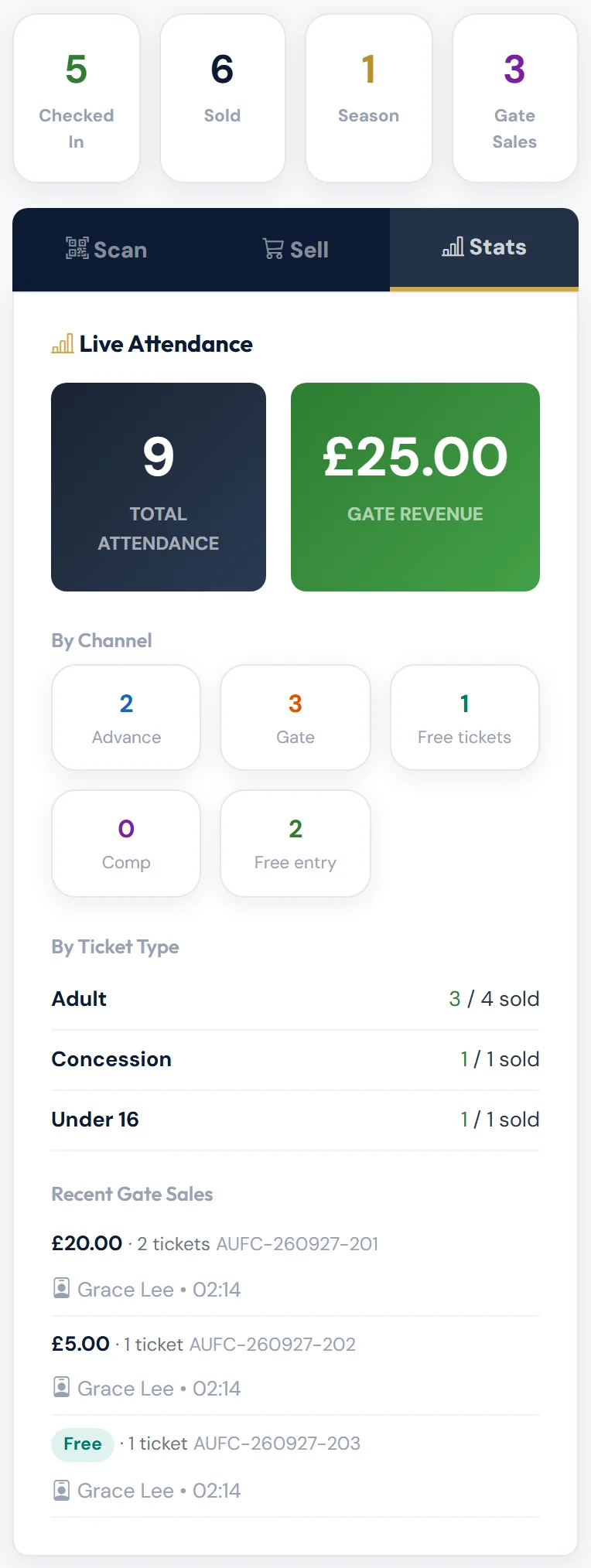
Tap any of the counters at the top — Checked In, Sold, Season or Gate Sales — to see the list behind it. Gate Sales counts paid tickets only. Free tickets still count in Checked In, Sold and TOTAL ATTENDANCE, and show Free as their price in the lists.
Some rows in the Checked In, Sold and Season lists have an Undo button, for a check-in made by mistake. See Scanning tickets.
Still stuck?
Tickets, season tickets and match day: Dan Birchmore