
If a season ticket holder hasn't got their pass, you can find them by name.
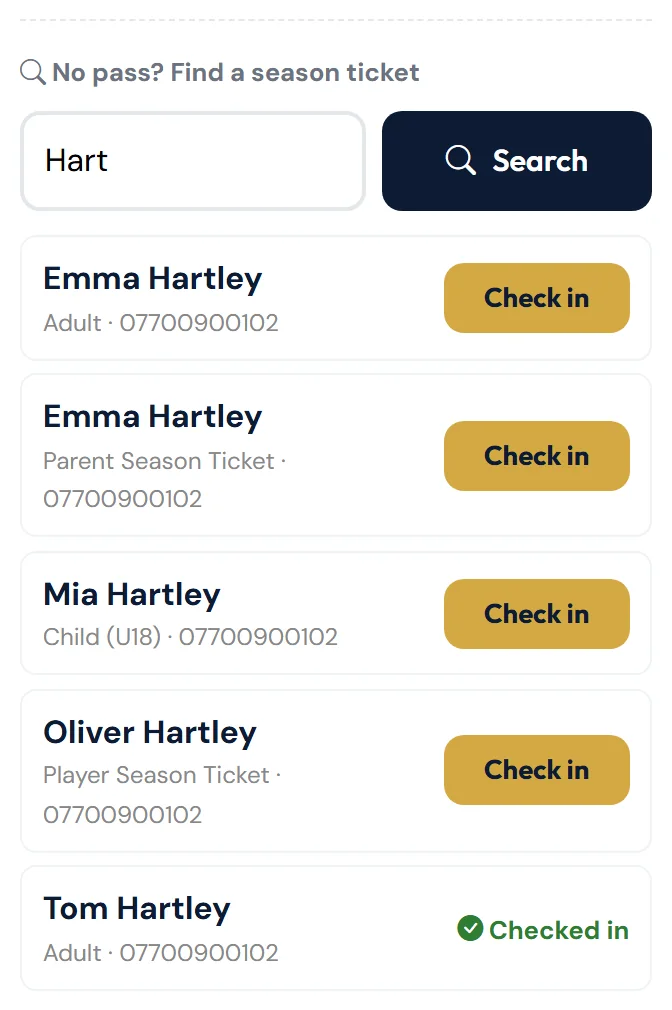
- On the Scan tab, go to No pass? Find a season ticket.
- Type at least 2 letters of their name — or their mobile number, or a player's membership number. Results appear as you type.
- Tap Check in next to the right person.
The result — for example "Season ticket holder checked in!" — appears in the result box above the search, just as if you'd scanned their pass.
Tapped the wrong person? Tap Undo this check-in in the result box. See Scanning tickets.
What you'll see
- Check in (gold) — tap to let them in.
- ✓ Checked in (green) — they're already in for this match.
- A status in red, such as Suspended — the pass isn't active. They can buy a ticket at the gate and contact the club.
Only passes for this season appear. The list updates after you tap Check in, so the person then shows ✓ Checked in.
Please be discreet — the list shows holders' mobile numbers.
Still stuck?
Tickets, season tickets and match day: Dan Birchmore