
My Camp Bookings
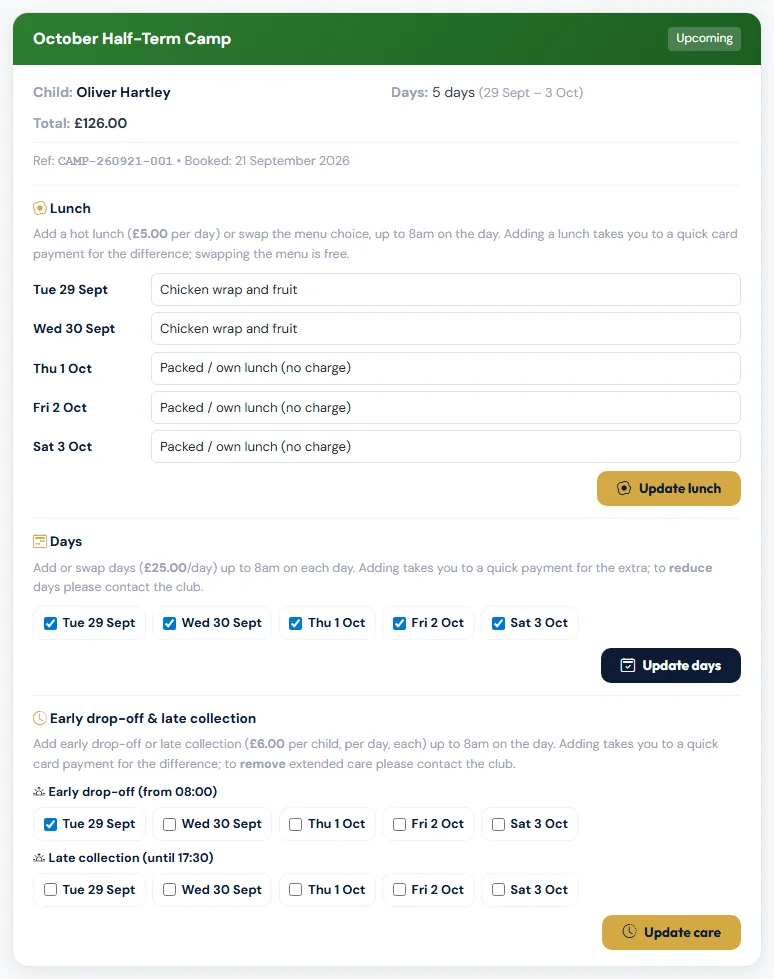
Choose Camps → My Bookings to see every camp booking for your family: upcoming, past and cancelled. Each card shows the child, days, total and booking reference.
What you can change yourself
Once a booking is paid, and until each day starts, you can:
| Change | How it works |
|---|---|
| Add a hot lunch | Choose a menu option for the day and Update lunch. You pay the lunch fee by card. |
| Swap the lunch choice | Pick a different option. Free. |
| Add or swap days | Tick the days you want and Update days. If it costs more, you pay the difference by card. |
| Add early drop-off or late collection | Tick the days and Update care. You pay the fee by card. |
The price shown is the one your family pays, including member pricing.
Changes for each day close at 8am on that day (UK time). After that the day shows · closed.
What the club needs to do
Contact the club to:
- remove days, lunches or extended care, or anything that would mean a refund,
- cancel a booking,
- move your child to a different camp.
When the club changes, moves, refunds or cancels a booking, you'll normally get an email showing the booking as it now stands. If there's more to pay, the email has a Pay button — see Paying a balance or a walk-up invoice.
Something to pay first?
If a booking hasn't been paid, or has a balance to pay, its card shows how much and a Pay button. You can make changes once it's paid.
Still stuck?
Holiday camps: Jo Gavin