
Opening your tickets
Your tickets live on a private web page, not in an account. Open it from:
- the View your tickets button in your confirmation email, or
- the link in the text message from ASCOTUTD.
The page shows the match, your order reference and one ticket for each person. If you bought more than one, swipe (or use the arrows) to move between them.
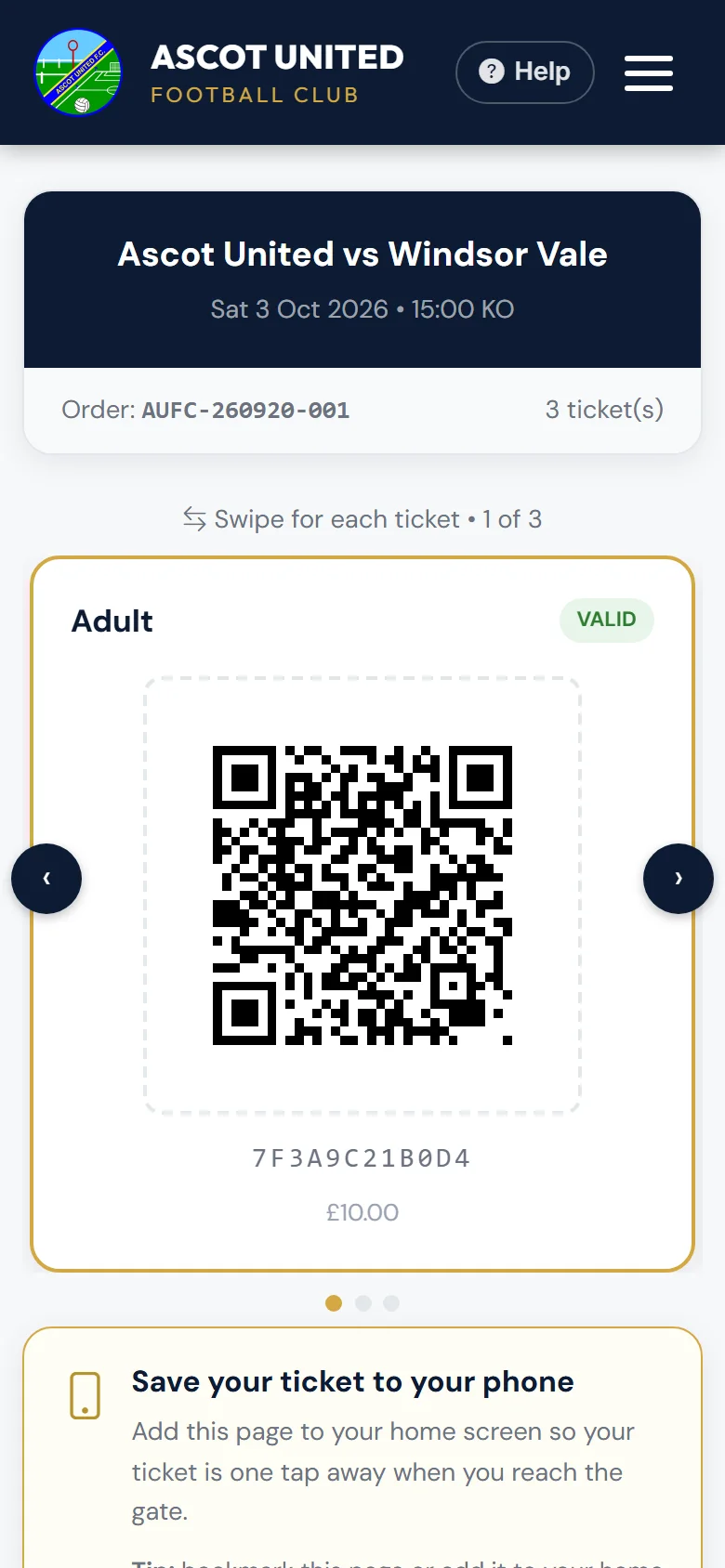
What's on each ticket
- The ticket type — for example Adult or Under 16.
- A QR code and a 12-character code underneath it. The code is useful if the QR won't scan — gate staff can type it in.
- A status:
| Status | Meaning |
|---|---|
| Valid | Ready to use. |
| Checked in | Already scanned at the gate, with the time. |
| Cancelled | Can't be used. Contact the club if you think this is wrong. |
Each QR code lets one person in, once. Don't share a screenshot of the same code with two people — the second scan will be refused.
Scanning your own QR code
If you scan your ticket's QR code with your phone's camera, you'll see whether it's valid. This doesn't use the ticket — only the gate's scanner does that.
Keep the link
The link always shows your tickets as they are now. Save it to your phone so it's ready at the gate — see Saving tickets to your phone.
Still stuck?
Tickets, season tickets and match day: Dan Birchmore