
The Foundation Academy and Girls Development Academy are paid one term at a time, in full. There's no monthly option.
Paying for the next term
When a term is ready to pay, your child's card on the dashboard shows a Pay button with the term's name — for example Pay Spring. The club may also email or text you a reminder.
- Choose Pay and the term name.
- Check your child's medical notes, allergies and photo / media consent, and update anything that's changed.
- Choose Continue to payment and pay on the secure Stripe page.
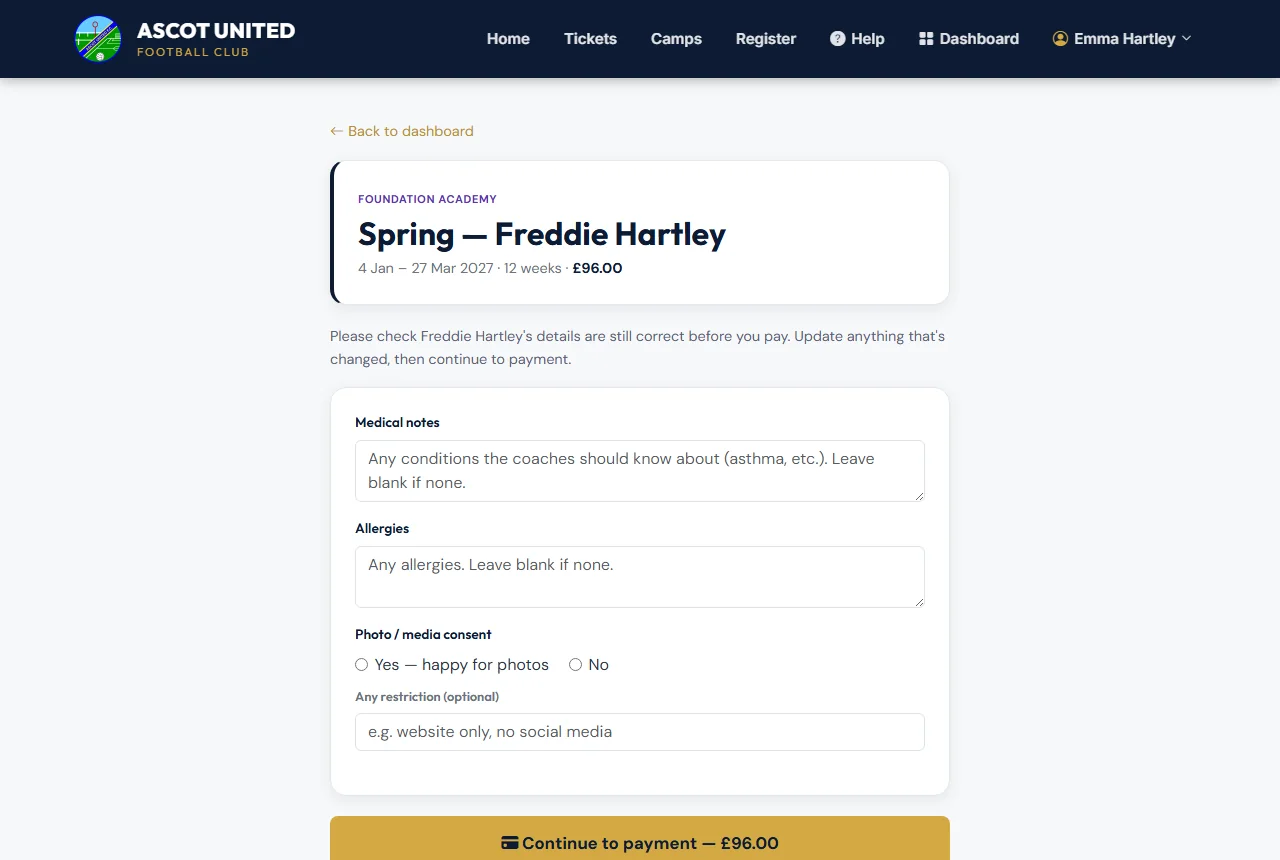
You'll get a Payment received email as your receipt, and the Pay button for that term disappears. The payment is also listed on My Payments.
If you pay the club directly (for example cash or bank transfer), the club records it against the term, and the Pay button for that term disappears too.
If you close the payment page without paying, choose Try payment again — it takes you back to the same term. Only the newest payment page works, and each one stays open for an hour, so if one has timed out just press Pay again. If a term is ever paid twice, the club is told automatically and refunds the extra payment.
When the buttons appear
A Pay button shows for each term in the current season that:
- has a fee set for your child's academy,
- hasn't finished yet, and
- you haven't paid for.
Moving on from the academy
Academy places are based on your child's age on 31 August. When your child grows out of the academy, the club will move them on at the start of the new season, and the Pay buttons stop appearing. If you'd like them to join a team, register them for Saturday / Sunday football.
Questions about the academy? Contact [email protected] 07856 210361.
Still stuck?
Foundation and Girls Development Academy: Jo Gavin